Real-time AI assistance for
interviews and critical meetings
Nexa AI is a translucent, always-on-top desktop overlay that reads your screen and captures system audio to stream context-aware solutions live in under 1.5 seconds.
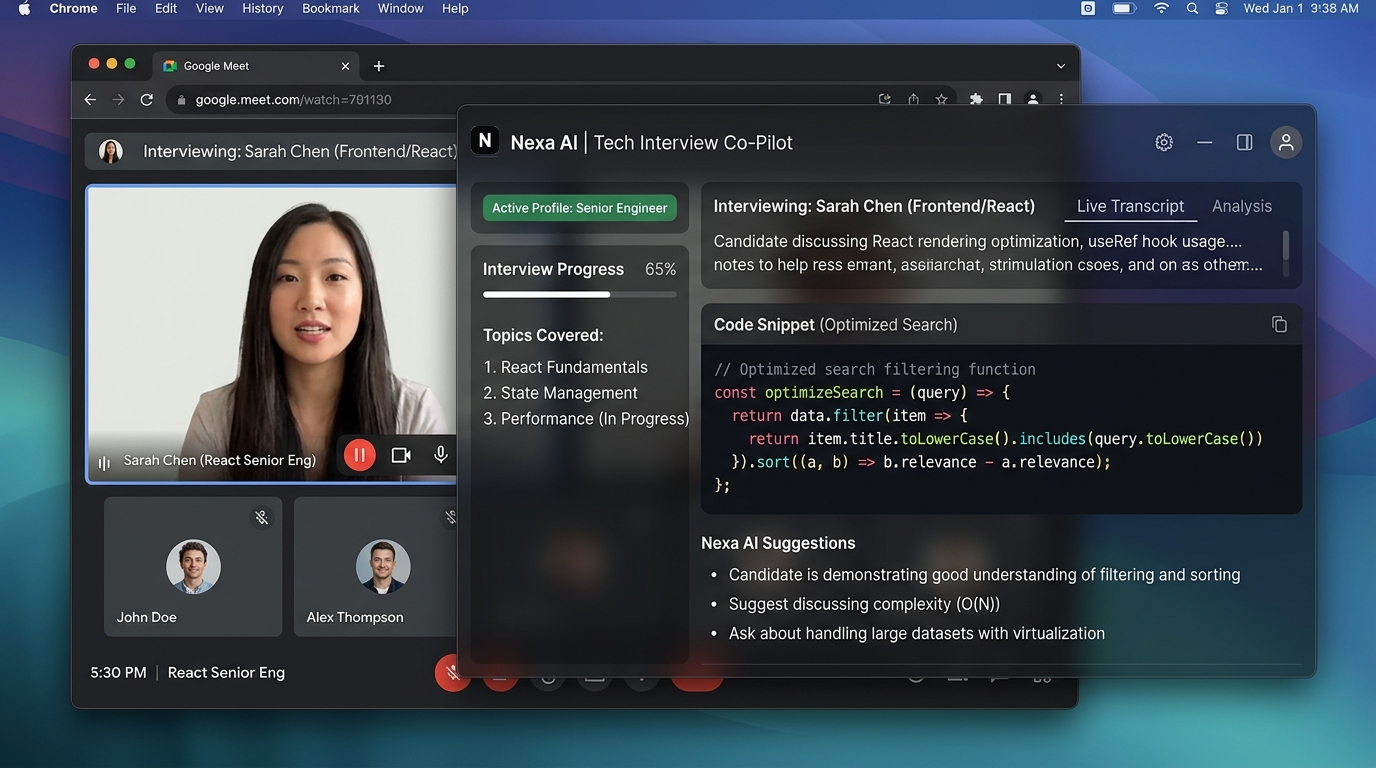
Experience Nexa AI In Action
Select an interviewer prompt on the left to see how Nexa AI's desktop overlay processes system audio and streams structured answers in real-time.
 Sarah Chen (Interviewer)
 Alex Thompson (You)
 Nexa AI
Built for performance and absolute privacy
Designed from the ground up to operate transparently on your desktop without interfering with your video conferencing apps.
Optimized Domain Tuning
Trained specifically on technical assessments, system architecture interviews, and executive business discussions.
Direct Audio Loopback
Uses native macOS SystemAudioDump APIs to capture clear speaker audio without microphone feedback or room echo.
Frameless Translucent Overlay
Sits comfortably over Zoom, Meet, Teams, or Slack calls while letting you see through to screen content.
Context Profiles
Instantly switch prompts between Technical Coding, System Architecture, Behavioral, and Salary Negotiation.
Click-Through Mode
Toggle click transparency with a quick shortcut to click UI elements underneath the overlay window.
Encrypted In-Memory Storage
All transcription data stays strictly in local memory and is purged immediately after your meeting ends.
Global Keyboard Controls
Manage window placement, opacity, and click behavior with instant global system hotkeys.
Test Hotkey Triggers
Click key combinations below or press them on your physical keyboard:
• Scope: Closure
Platform Compatibility
Select any video platform or technical testing environment below to inspect the integration architecture and stealth parameters.




HackerRank Integration
100% STEALTH COMPLIANCEIntegration Architecture
Nexa AI runs on an independent OS window layer. It never grabs active browser focus, making it fully invisible to HackerRank focus-loss tracking. Key inputs are emulated via Ring-3 virtual drivers.
Technical Defenses Bypassed
- Clipboard hook filters (Bypasses paste blocking completely)
- Page Visibility API tracking (Bypasses tab change monitors)
- Blur-focus listeners (Browser never registers tab focus loss)
[OK] Hooking browser tab events: zero-out visibilitychange triggers
[STEALTH] Simulating natural peripheral keystrokes...
How Nexa AI Compares
Compare core capabilities, audio capture methods, and real-time performance of Nexa AI against standard alternatives.
| Feature | Nexa AI | Cluely AI | Parakeet AI |
|---|---|---|---|
| Stealth Architecture Protection against browser focus-loss logs and screen sharing. |
Kernel-Level (Ring-3)
Undetectable by focus traps and clipboard monitors. Includes Click-Through overlay support. |
Basic Overlay Only
Standard window overlay. Prone to focus loss detection on proctor systems. |
Browser Extension
Only spoofs visibility APIs. Visible in browser extension registries. |
| Audio Integration Method of capturing interviewer speech output. |
Direct Loopback Driver
Native macOS SystemAudioDump driver inside OS kernel. |
Mic Capture
Captures ambient sound from speaker. Prone to room echo and feedback. |
Virtual Cable
Requires third-party audio driver setup. Higher latency and setup dropouts. |
| Response Speed Time from speech audio to solution display. |
Sub-1.5s
Local memory engine handles direct streaming. Answers appear under 1.5 seconds. |
2.5s - 4.0s
Server query routing creates noticeable delays during technical coding questions. |
3.0s - 5.0s
Queued cloud API requests. Unstable stream speeds cause awkward conversation pauses. |
Simple, transparent pricing
Choose a plan tailored to your job hunting timeline or ongoing executive meeting needs.
Hourly Pass
For one-off technical assessments or key customer pitches.
- 1 Hour Active Overlay Credit
- Technical Profile Access
- System Audio Loopback
- Translucent Desktop HUD
Pro Package
Designed for active job seekers aiming for top tech offers.
- 15 Active Session Hours / Mo
- All Profiles (Technical, Sales, Neg)
- Click-Through Mode
- Priority High-Speed Queue
- 24/7 Priority Support
Executive Elite
For agency representatives, senior leaders, and daily overlay demands.
- Unlimited Live Overlay Hours
- Custom Weights Tuning
- Dedicated Model Server
- Multi-Device License (3 Devices)
- 1-on-1 Onboarding Setup
Frequently Asked Questions
Clear answers to common questions about installation, stealth drivers, and privacy.
No. Nexa AI runs as an isolated macOS desktop application (Ring-3 kernel driver level). It does not inject code into Chrome DOM or trigger page visibility/focus loss listeners.
Nexa uses native macOS SystemAudioDump APIs to read speaker audio output directly from the OS audio engine, avoiding mic feedback or room noise.
Nexa AI currently supports macOS 12.0+ (both Apple Silicon M-Series & Intel chips). Native Windows 10/11 support is currently in active development and coming soon!
Pressing Cmd + M toggles click transparency, enabling your mouse clicks to pass straight through the overlay window to your video call or code editor underneath.
Ready to elevate your meeting performance?
Download Nexa AI for macOS or Windows and experience real-time, context-aware assistance on your next call.